
We’ve upgraded how you sign in to Mir Vengeance on the website and in the game client. Here’s what’s new and how to use it.
Sign in with Google or Discord
You can now log in using your Google or Discord account — no separate game password required for your first visit.
In the game client
- Click Google or Discord on the login screen
- Your browser opens to sign in securely
- After you approve access, you’re sent back to the game automatically — no need to copy a code
On the website
Use the same Google or Discord buttons on the account login page
One sign-in works for the website account area and links to your game account
New players
If you’ve never played Mir Vengeance before:
- Sign in with Google or Discord from the game client
- Your account is created automatically when you complete sign-in
- You can create characters and start playing straight away
No manual registration form is required for social sign-in.
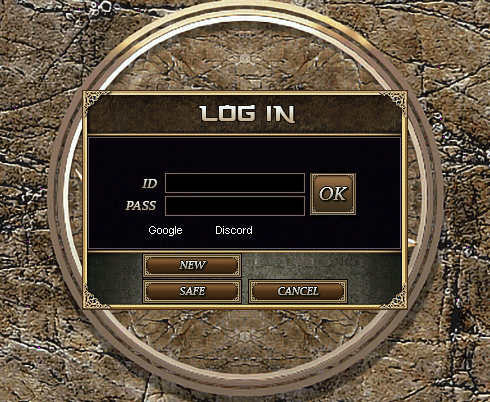
Returning players
If you already have a game account tied to the same email as your Google or Discord account, social sign-in will link to that account automatically.
Email & password login (optional)
Prefer a traditional login, or want a backup if social sign-in isn’t available?
- Sign in on the website with Google or Discord
- Go to your Account page
- Under Email & password login, set a password for your verified account email
Password requirements
At least 8 characters
Must include uppercase, lowercase, and a number
After that, you can log in with email + password in the game or on the website — no browser step needed.
You can also save email and password in the game launcher (patcher) using “Remember username” and “Remember password” for faster login next time.
Security & privacy
Sign-in uses industry-standard OAuth — we never see your Google or Discord password
One-time login codes (when used) expire quickly and can only be used once
Account passwords are stored securely on our servers
New accounts are created by the game server — your account data stays in one place
Discord tip
If you use the Discord desktop app, after you click Authorize, check your web browser (Chrome, Edge, etc.) — the “finish login” page opens there, not inside Discord.